01 · Blank workbook
Your own enquiries
A clean copy with prepared input rows and calculated checks. Its reference date uses TODAY(); recalculate or reopen the file each day to refresh it.
Download blank Excel workbook ↓enquiry-tracker.xlsx Practical Margin
Give every enquiry a useful next step. This simple tracker helps you see what needs attention, what is waiting, and which records need a little more detail.
Free .xlsx files. No signup. The Guide is inside each workbook.
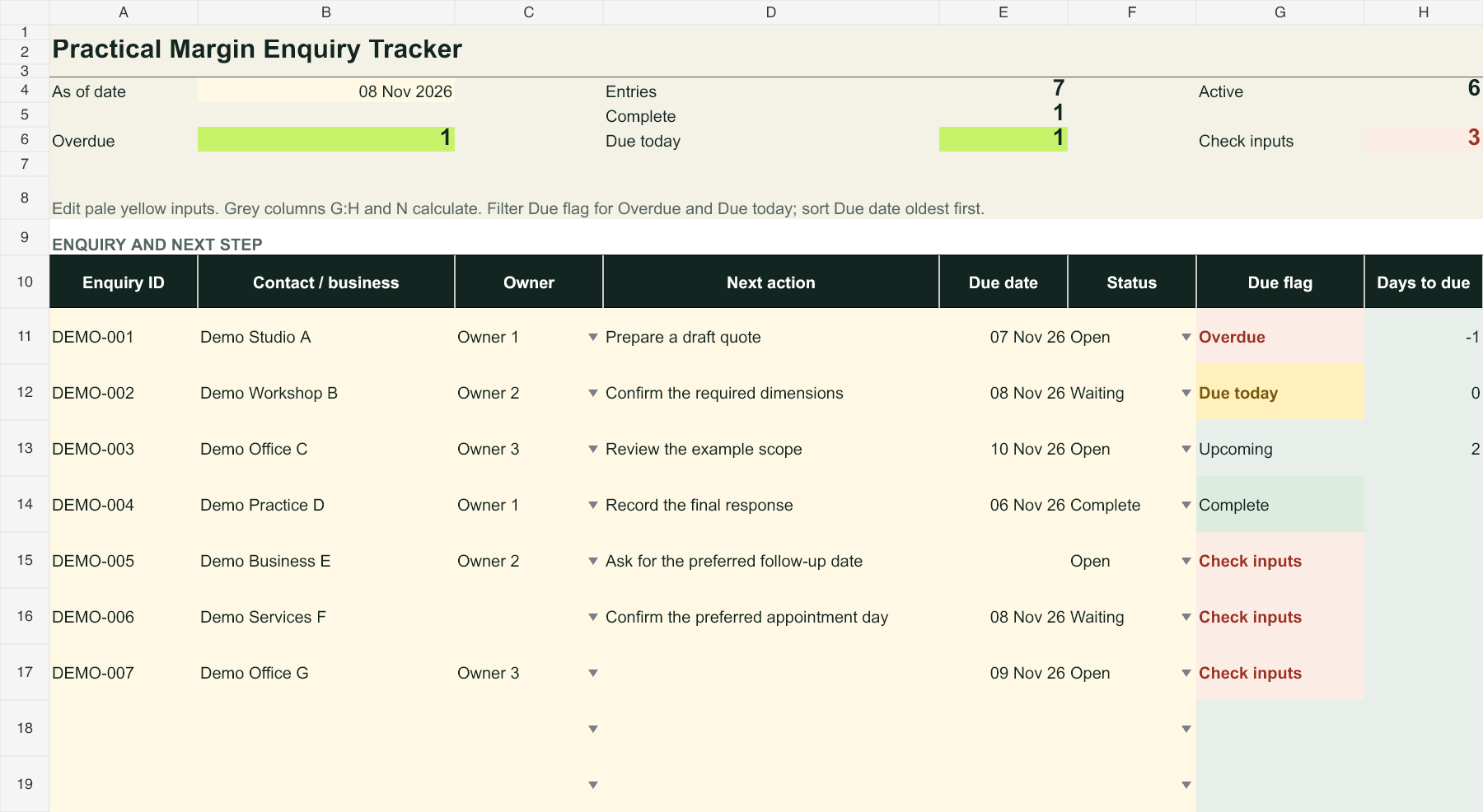
The worked example shows how an owner, an action and a date fit together. It also includes incomplete records so you can practise fixing them.
“Demo Studio A” belongs to Owner 1. An open enquiry needs someone responsible for its next step; a blank owner is flagged for checking.
Calculated workbook render · Fictional data“Prepare a draft quote” tells someone what to do. Update the next action after each contact instead of relying on a vague “deal with this”.
Calculated workbook render · Fictional dataAt the example’s 8 November reference date, 7 November is overdue. Waiting remains active, so a waiting item due on the reference date is still due today.
Calculated workbook render · Fictional dataStart clean, or practise first. Both workbooks include a Tracker sheet and a Guide with instructions and an editable owner list.
A clean copy with prepared input rows and calculated checks. Its reference date uses TODAY(); recalculate or reopen the file each day to refresh it.
Download blank Excel workbook ↓enquiry-tracker.xlsxSeven invented records show different statuses and three missing details: due date, owner and next action. The fixed 8 November 2026 reference date makes the examples repeatable.
Download worked example ↓enquiry-tracker-example.xlsxInstructions cover the daily routine, flags, required inputs, dates, optional estimates and limitations. Use the owner list in the Guide to adapt the workbook to your process.
Read the starting steps below ↓Open the Guide tab inside either workbook.Use the worked example if you want to explore before entering your own details.
Open the .xlsx file in Microsoft Excel, then read the Guide. Keep a clean copy before adapting the workbook.
Edit the owner names in the Guide. Use the clean Tracker for your own enquiries; every example business in the separate practice file is fictional.
Enter one enquiry per prepared row, using rows 11–210. Fill the required details, including owner, next action and due date. Pale yellow cells are inputs; grey G:H and N cells contain formulas.
Fix any “Check inputs” issue. Filter Due flag to Overdue and Due today, then sort Due date oldest first. Update the next action and due date after contact, and save the file.
Watch the first Practical Margin Short for the three questions behind the tracker: who owns it, what happens next and when is it due?
Choose a clean file or a fictional example. No signup required.